How deep shall we go?

If you only have five minutes. The essentials, with practical examples. If you want to see what's behind it.

The question isn't what the system can do. It's how much work it takes off HR's and managers' shoulders.

What happens if there's a dispute later?

The system's goal is not just to produce the document — but to make it retrievable later exactly what happened.

Who accepted the document?

The system clearly shows which party confirmed the acceptance.

When did acceptance happen?

The timestamp is logged and retrievable at any time.

Which email address received the code?

The code delivery target is visible — no need to search through emails.

Which document version was in effect?

Acceptance is tied to the specific version, not just the filename.

Was a receipt generated?

The acceptance receipt is retrievable and verifiable separately.

Has the document changed since then?

If a modification occurred later, it is visibly traceable in the audit trail.

What status is the process in?

At a glance: awaiting acceptance, closed, or requires further review.

During an internal or external review, all this data is available in one place, in a readable format.

A new hire can be handled almost fully paperless

From onboarding data collection to acceptance and archiving, the process stays in one system — HR doesn't print, scan, ping-pong Word files or re-type the same data. What used to be hours of admin per hire now assembles automatically.

No printing No scanning No Word file ping-pong No duplicate data entry
1
The new hire fills in onboarding data

Required personal and HR data is collected once, in one place. HR doesn't have to re-type the same details.

2
HR reviews the submitted data

All incoming data is visible in one workflow, so review stays quick and transparent.

3
The system generates documents automatically

Required HR documents are generated from the approved data without copy-paste work.

4
Online acceptance or QES signature

Documents can be accepted online with OTP or signed with QES for official use — without paper loops: no print-sign-scan-return cycle, acceptance is done in minutes.

5
Archived in the digital employee folder

Final documents and acceptance trail are stored in a retrievable digital employee file.

Hours of HR admin per hire disappear — no printing, scanning or chasing, with faster payback.

Not a document store. Workflow + evidence in one.

Most systems just file the document away. oneDox runs the whole process — and proves it happened.

Onboarding & workflow

New-hire data capture, document generation and process steps in one flow.

Acceptance & signature

OTP acceptance or QES signing — same surface, same audit trail.

Evidence & receipt

Timestamps, event chain, archived acceptance receipt — every step recorded.

Validation & audit

Independent verification, EU DSS validation, report and export — provable later, too.

Document + process + evidence — in one place.

How it works — in short

The document's path from generation to archive — same trail, same evidence.

  1. Generate Final document from HR data.
  2. Review Check before acceptance.
  3. Sign OTP or QES — same trail.
  4. Validate Independent EU DSS verification.
  5. Verify Via QR or link, later too.
  6. Archive Closed with a retrievable receipt.

Acceptance that stays traceable.

The steps of the employee and the employer are logged separately — so it's always visible later who accepted which document version and when.

Two-sided OTP acceptance

Both the employee and the employer can confirm acceptance with their own unique one-time code. The system automatically tracks where each party is in the process.

Acceptance receipt

An archived PDF receipt is generated for each acceptance — retrievable and verifiable at any time.

Traceable event log

The system logs the time, parties, status and the linked document version. No need to search through emails and filenames during a later review.

Technical integrity

A connected event chain in the background protects the integrity of the log — it works on the IT layer; HR doesn't need to deal with it.

The detailed technical solution can be found in the 'Technical background' section.

What it looks like

A list for the employee. Proof for the company. The same process, from two sides.
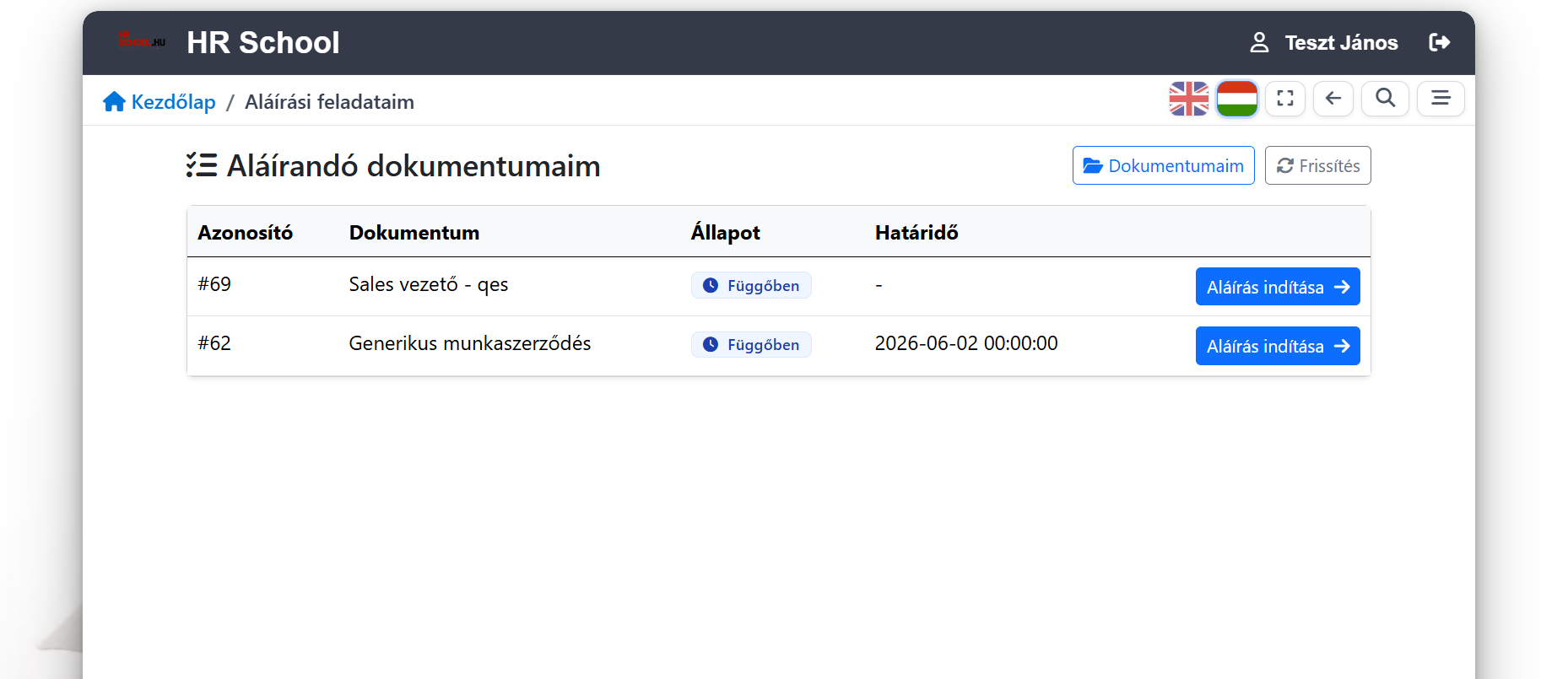
Employee signing inbox: documents to sign with status and deadline.
What do I have to sign — and by when?
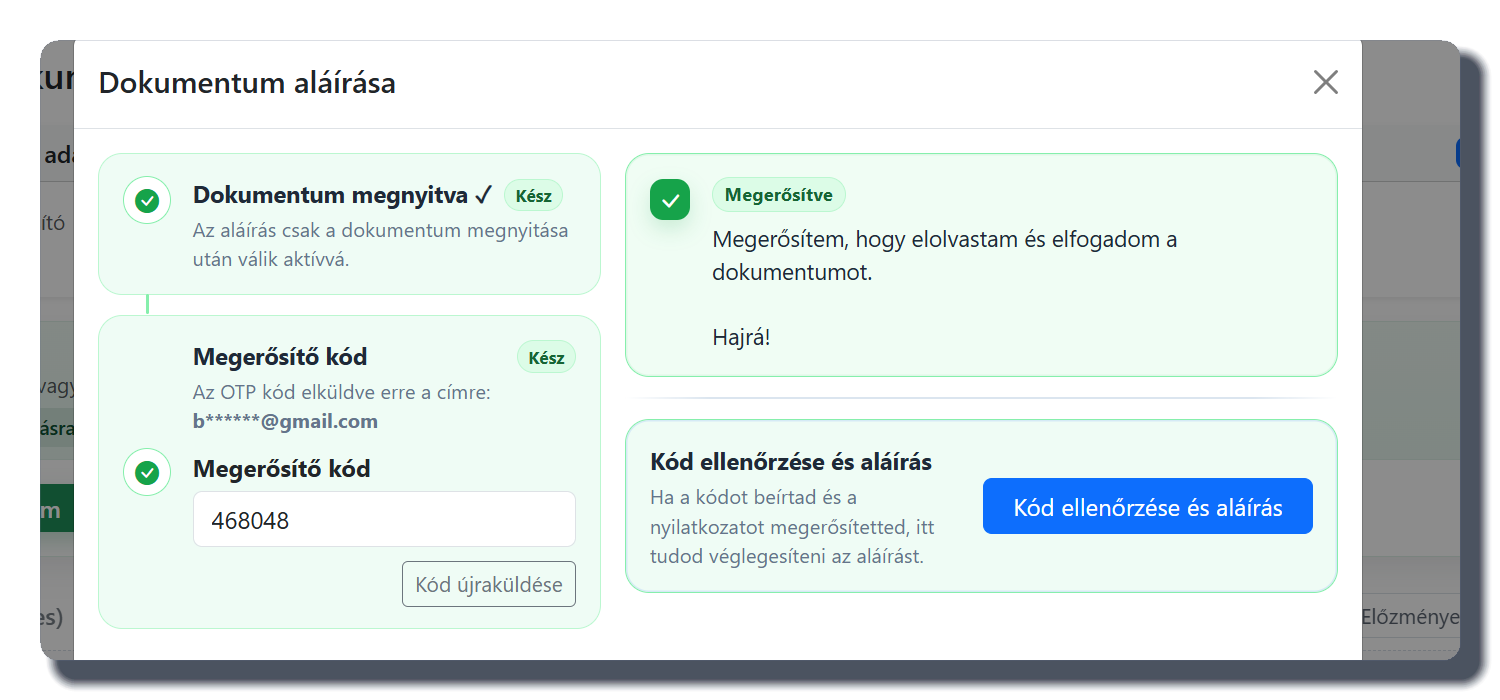
Acceptance dialog: open, one-time code, declaration.
How does someone accept it in minutes, without paper?
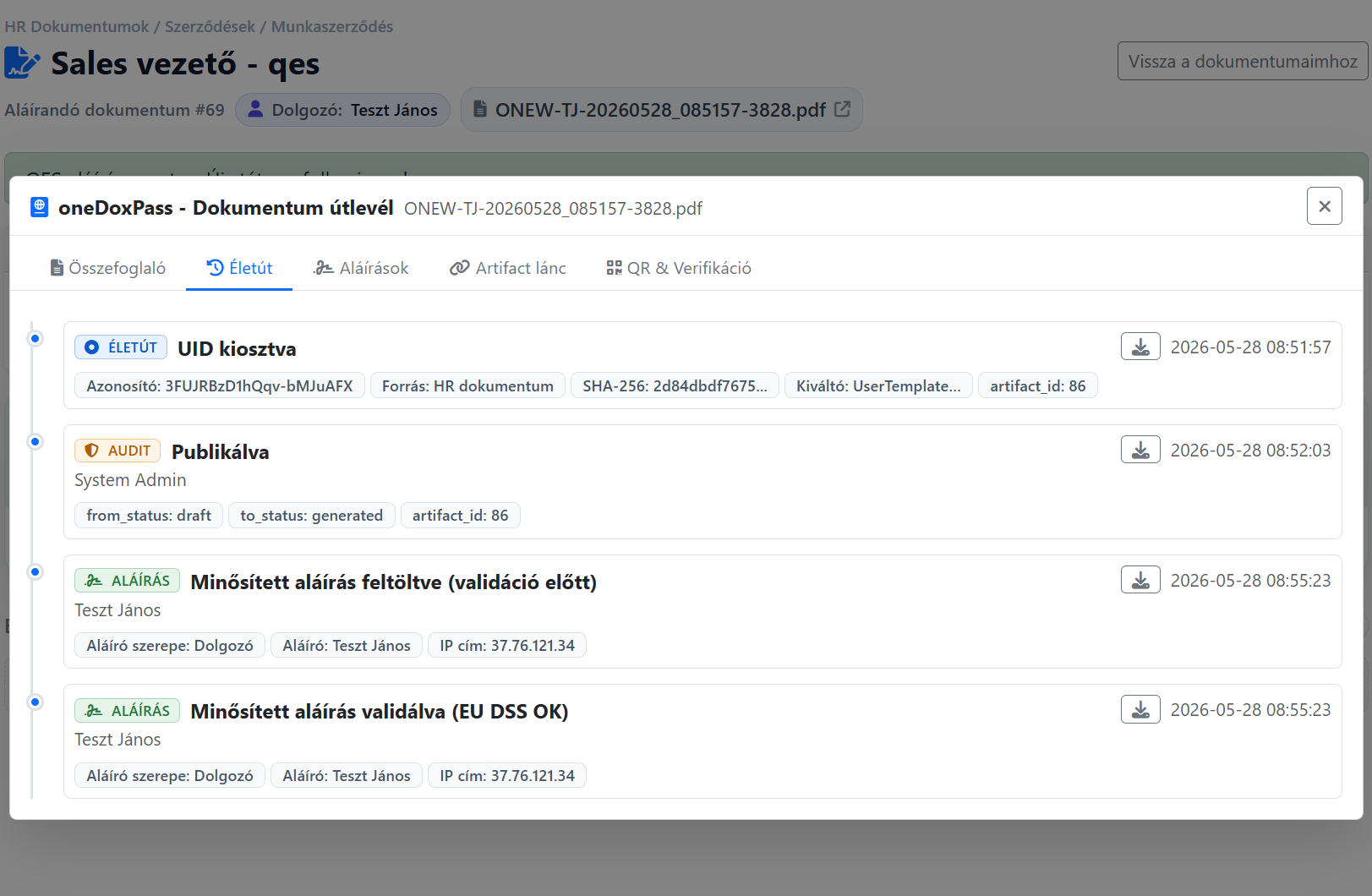
Document life cycle: assignment, publication, acceptance, verification in order.
Where is this document now — and what has happened to it?

Real screens from live systems, with client and personal data redacted.

See the whole process in detail →
Compliance

Ready for review and export

Audit-ready reports help you quickly see which documents are signed, awaiting acceptance, expired or need review.

  • filter by status
  • search by employee
  • date filter
  • CSV export
  • search by event ID
Riport minta

Audit report — sample

Signed Awaiting acceptance Expired Needs review
Employee Policy Accepted · 2026.05.14
OK
Confidentiality Declaration Awaiting acceptance · 3 recipients
In progress
Data Processing Notice Expired version · re-sent
Needs review

Audit-ready reports help you quickly see which documents are signed, awaiting acceptance, expired or need review.

Solutions for every HR need

How do we know everyone is prepared?

oneLearning

  • Upload own materials
  • Videos, PDFs, tests
  • See who is where
Learn more
How do we know the knowledge shows up in the work?

onePerformance

  • Individual goals
  • 360° feedback
  • Development plan
Learn more
How do we know the new hire has truly got going?

get-2.work

  • Documents automatically
  • E-learning materials assigned
  • Task list for the employee
Learn more

Frequently asked questions

What people ask most often before introducing it.

What is the difference between online acceptance and a qualified electronic signature?
Online acceptance is part of a traceable document process handled inside the system. Where a document requires a qualified electronic signature, the process supports that as well. Which signing method applies is always determined by the document and the requirements of the given process.
What does the employee see?
A list of what they need to accept or sign, and by when. Online acceptance runs in the browser with nothing to install; for a qualified signature the provider's own process follows.
What happens if someone prints the document?
Every page carries a verification code that traces the page back to the original document and lets its status be checked — without logging in.
Where does the employee find their own documents later?
In the digital personnel folder: the closed document and the receipt of its acceptance stay together, so there is no need to search through e-mails.
What does it take to get started?
The document templates, the required data and the signing/acceptance process need to be set up. How deep the rollout goes depends on how many document types and processes you want to cover.
How long is a document kept?
There is no automatic deletion: the closed document and the record of its acceptance stay in the system. A signed document cannot be permanently deleted at all — archiving is a change of state, not removal.
SaaS
vagy
On-site

Choose what suits you

Supports both cloud (SaaS) and on-site (on-site) deployment. Detailed service models are presented on the oneSolution page.

View details →

Qualified signature, independent validation, event chain, oneDoxPass, technical background.

See it in detail

Contact

Provide your phone for a quick callback

Email address

info@onelearning.info

Postal address

One Learning Zrt.
1021 Budapest, Budakeszi 51/D C.ép. II/5