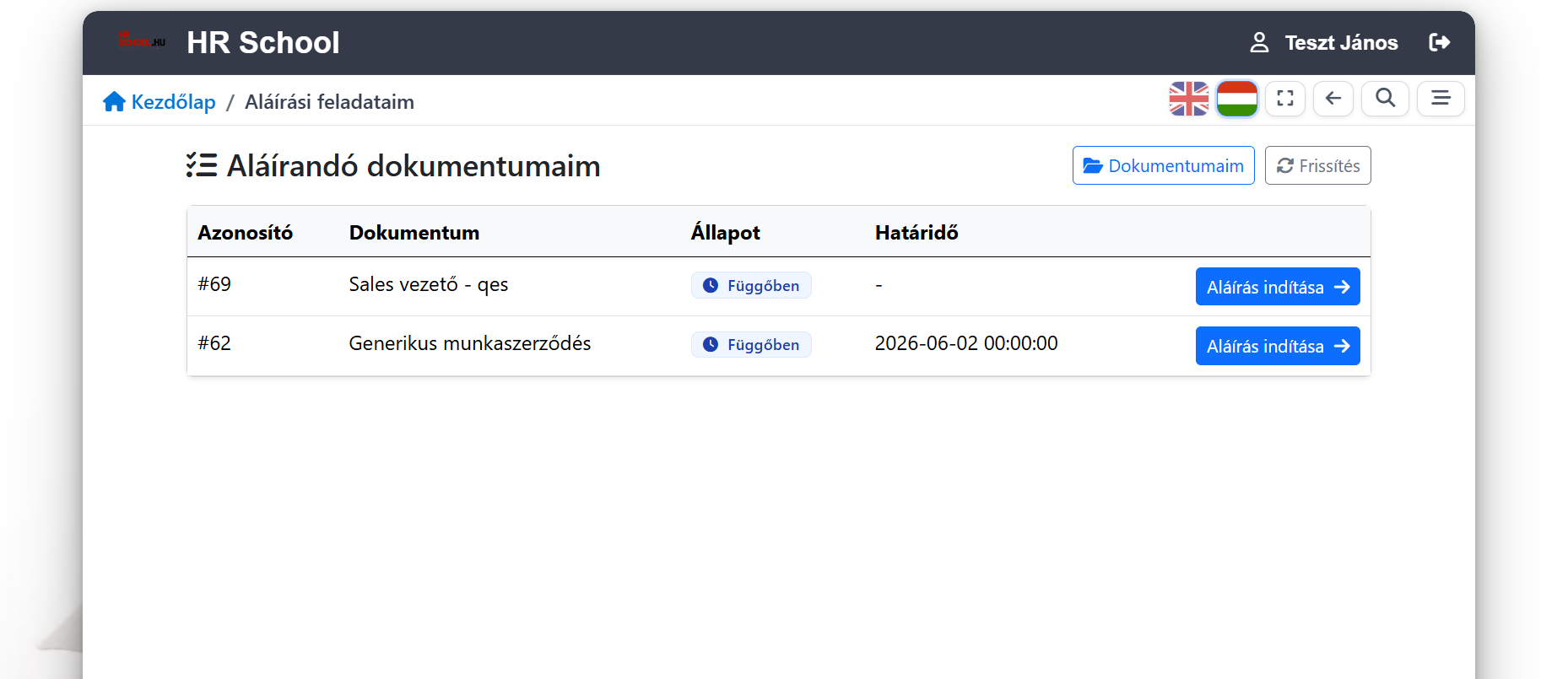
How deep shall we go?

If you only have five minutes. The essentials, with practical examples. If you want to see what's behind it.

What happens if there's a dispute later?

The system's goal is not just to produce the document — but to make it retrievable later exactly what happened.

Who accepted the document?

The system clearly shows which party confirmed the acceptance.

When did acceptance happen?

The timestamp is logged and retrievable at any time.

Which email address received the code?

The code delivery target is visible — no need to search through emails.

Which document version was in effect?

Acceptance is tied to the specific version, not just the filename.

Was a receipt generated?

The acceptance receipt is retrievable and verifiable separately.

Has the document changed since then?

If a modification occurred later, it is visibly traceable in the audit trail.

What status is the process in?

At a glance: awaiting acceptance, closed, or requires further review.

During an internal or external review, all this data is available in one place, in a readable format.

Acceptance that stays traceable.

The steps of the employee and the employer are logged separately — so it's always visible later who accepted which document version and when.

Two-sided OTP acceptance

Both the employee and the employer can confirm acceptance with their own unique one-time code. The system automatically tracks where each party is in the process.

Acceptance receipt

An archived PDF receipt is generated for each acceptance — retrievable and verifiable at any time.

Traceable event log

The system logs the time, parties, status and the linked document version. No need to search through emails and filenames during a later review.

Technical integrity

A connected event chain in the background protects the integrity of the log — it works on the IT layer; HR doesn't need to deal with it.

The detailed technical solution can be found in the 'Technical background' section.

Document lifecycle

The states of a document

The system knows exactly where every document stands. What the user sees is a business state, not a technical status — and only the system moves a document between states; it can't be overwritten by hand.

The main path

  1. Draft

    HR is working on it. The employee can't see it yet.

  2. Awaiting signature

    Issued. The employee can open it, accept it or reject it.

  3. Partly signed

    One side has accepted, the other is pending. The two steps are logged separately.

  4. Done

    Both sides have accepted. Receipt, timestamp, verification code.

Side branches

  • RejectedThe employee did not accept — with a reason.
  • WithdrawnHR recalled it after issuing.
  • ExpiredThe deadline passed without acceptance.

All three states stay in the record. Nothing disappears, nothing is overwritten.

The stronger level

If the document type requires a qualified signature, the document is not “done” after OTP acceptance but “basic done” — shown in its own colour until the QES arrives. A state that cannot be confused with final.

Some documents only need to be issued, not signed. The system treats that as a state of its own — “issued”, not “pending” — so it never shows up as an overdue task.

Once a document has reached an accepted state, it cannot be deleted. It can be withdrawn, and archived after withdrawal — but its trace remains. That is not a setting; it is a rule of the system.

oneDoxPass

Every document has a passport

The system assigns a unique identifier to every document and embeds two QR codes — whether the PDF was generated, admin-uploaded or QES-signed. One identifies the content; the other reveals the full document lifecycle — retrievable at any time, from anywhere.

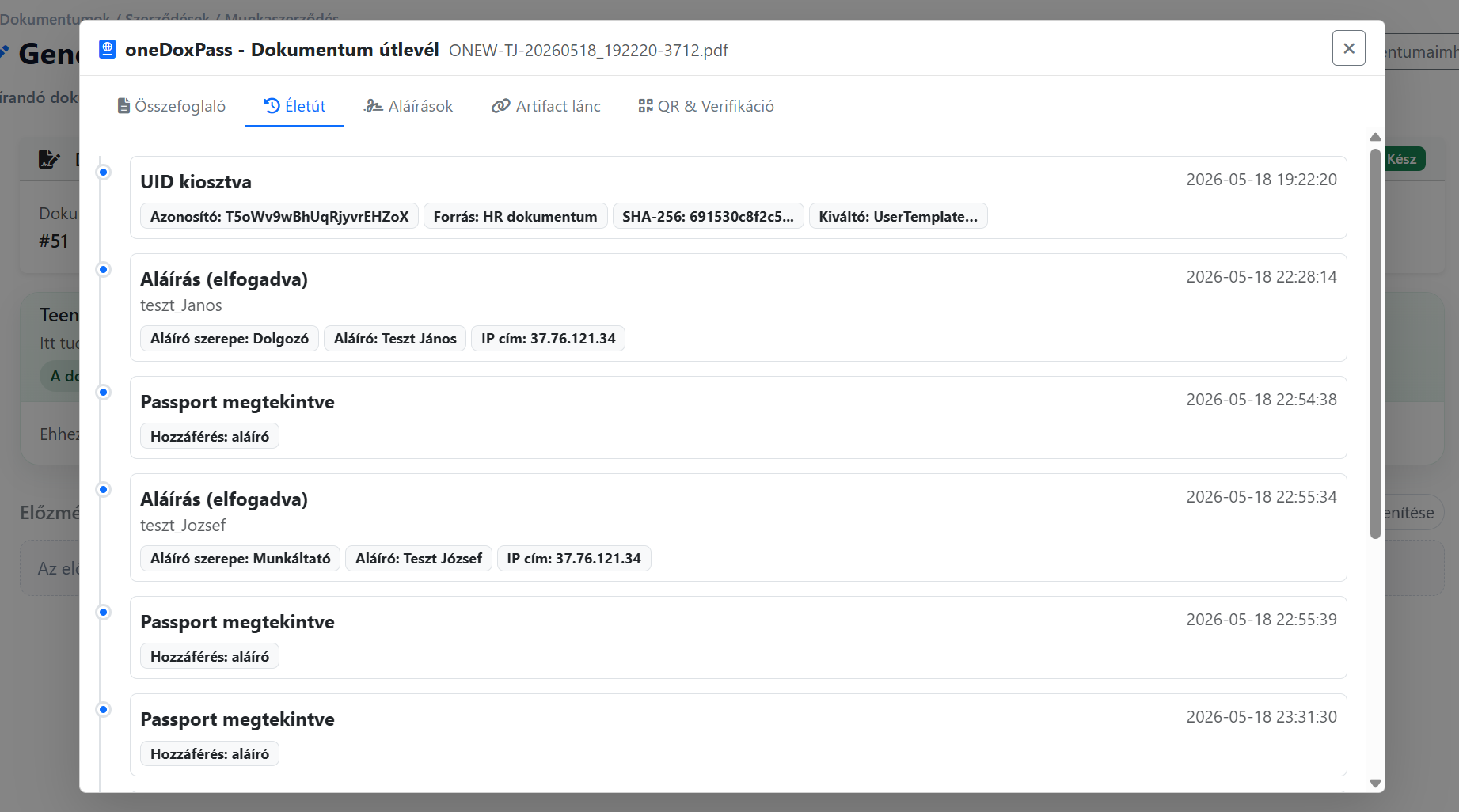
oneDoxPass document passport — lifecycle audit timeline screenshot

Unique document UID

Each document receives a nanoid-based unique identifier at generation time. This ID stays linked to every step of the lifecycle — from creation to archiving.

Dual QR on every page

Left QR: the Passport URL where the lifecycle is viewable. Right QR: content-hash-based verification. Both appear on every single page — retrievable even when printed.

Public verification — no login required

The Passport URL is publicly accessible: it shows the document's status and basic details. The full lifecycle is available with authenticated access (owner / admin).

Full lifecycle across tabs

Summary, Lifecycle, Signatures, Artifact chain and QR & Verification — each layer in its own tab. Admins additionally see the raw DSS payload.

Signatures tab — independent EU DSS

Each signature on its own card: signer from the certificate, Trust Service Provider (TSP), DSS INDICATION (TOTAL_PASSED), qualification level (QESIG / QES / AdES), revocation status and the full DSS report — one click away.

QR-based verification

One QR. One proof. Anywhere, anytime.

Every issued document carries its own verification code. Anyone who scans it sees: real, untouched, and we know who accepted it — no login required.
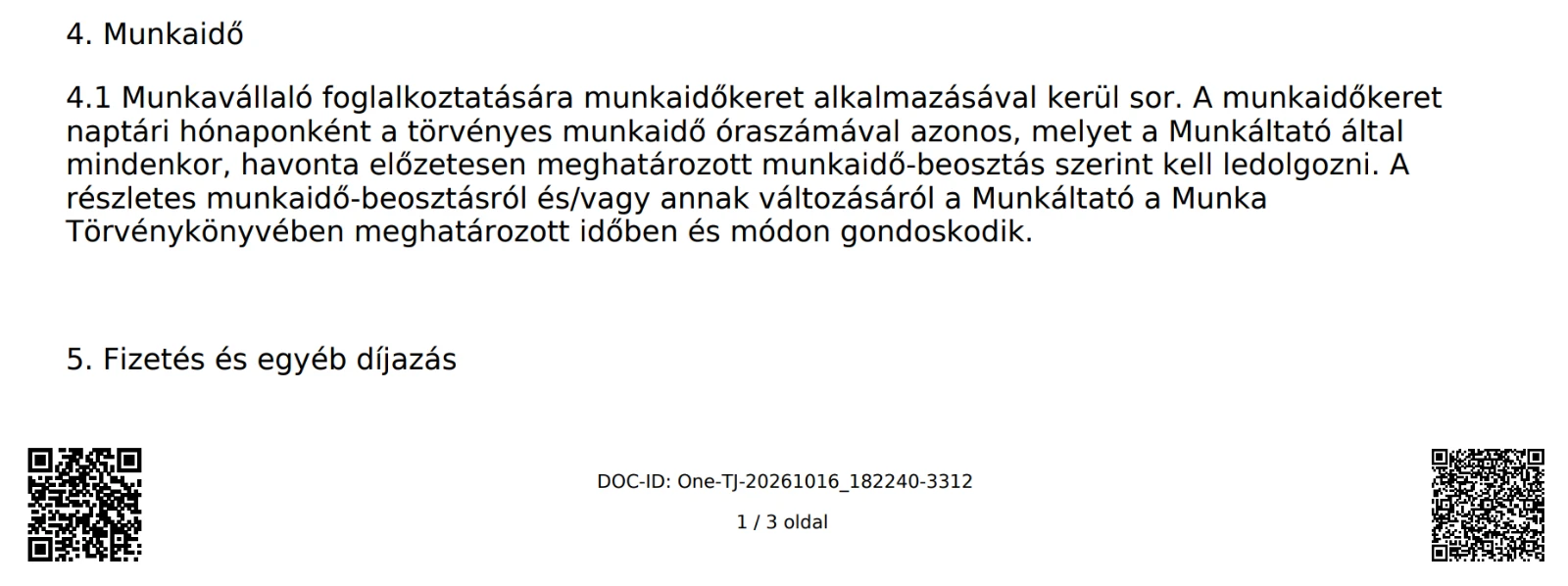
Two QR codes and a unique DOC-ID in the PDF footer
Every page carries a QR — and its own DOC-ID Bottom-left: the passport QR (full lifecycle). Bottom-right: the quick verification QR. In between: the document's own ID and the page number — traceable back to the original even when printed or photographed.
PDF lap mockup Ellenőrizve
Verified
Type
Employment contract
Issued
2026-03-14
SHA-256
a1b3…f9c2
Page
3 / 7
Status
valid · untouched
Dokumentumhoz kötött azonosítás

A nyomtatott vagy továbbküldött oldal is visszavezethető az eredeti rekordhoz, így a HR csapat később sem marad bizonyíték nélkül.

Page-level verification

Not just the file — a specific page is identifiable, even printed, photographed or forwarded.

Public = hash + status only

The public QR carries no PII: only type, SHA-256, issue date and status are visible. The full Passport (signers, lifecycle) requires authenticated access.

Receipt linkage

The QR points to the acceptance evidence, not just the file — you see who accepted, and when.

Independent verification

No need to log into oneDox to confirm a document's authenticity.

Paperless operation — with paper-grade verifiability.

A signature you can prove

You don't just sign something. You can also prove later who accepted what, when and under which conditions.

Signature

DAP (employee: download → external signing → upload) or connector (employer: SMS transaction code + signing PIN) — same flow, same evidence.

provider-agnostic
Validation

Independent EU DSS round for every signature: qualification level (QESIG / QES / AdES), Trust Service Provider, certificate chain and revocation status — eIDAS-traceable.

EU DSS validation
Evidence

Timestamp, device data, IP, acceptance context — sealed in an integrity-protected package.

evidence chain
Verification

Years later, via link or QR — anyone with access can verify it for themselves.

long-term verifiable

DAP, eIDAS QES or internal OTP acceptance — same flow, same evidence. The signing level is set per signer: on the same document the employee can use OTP and the employer can use QES. Employee-authenticated documents are validated via mandatory EU DSS verification before they're accepted.

✅ Available

QES web upload

A PDF signed by your QES provider can be uploaded, traceably logged and accepted after validation.

✅ Available

Employer-side integrated QES (live)

SMS transaction code + signing PIN → the connector signs the PDF → mandatory EU DSS round → save. Employer-side signing only starts after the employee-side EU DSS validation succeeds.

A signature is only worth something if it can be proven later. That's what we do.

How every step is recorded.

A simple, clear process that links the document, the acceptance and the review.

01
Document generated — the final HR document is produced. #f0e573bf…
02
Per-page QR identification — every page traces back to the original file. #e1b9a2ac…
03
Sent or made available — the employee receives or accesses the document. #49747a2c…
04
OTP-based acceptance — both parties confirm separately. #912f6b63…
05
Archived receipt — the retrievable confirmation is generated. #5ffeb096…
06
Audit report — all required data is accessible in one click. #69b839c4…
Review: All steps in order ✓

In the background, events are linked in a hash chain — subsequent modifications leave a visible trace.

Compliance

Ready for review and export

Audit-ready reports help you quickly see which documents are signed, awaiting acceptance, expired or need review.

  • filter by status
  • search by employee
  • date filter
  • CSV export
  • search by event ID
Riport minta

Audit report — sample

Signed Awaiting acceptance Expired Needs review
Employee Policy Accepted · 2026.05.14
OK
Confidentiality Declaration Awaiting acceptance · 3 recipients
In progress
Data Processing Notice Expired version · re-sent
Needs review

Audit-ready reports help you quickly see which documents are signed, awaiting acceptance, expired or need review.

Interested in the solution? Let us show you →
Technikai háttér

Technical background

This layer is for IT and review teams — on the HR side, only the key message is visible.

How does the system protect the integrity of the event log?

Events are arranged in a hash chain, so if an earlier entry were modified, the discrepancy is immediately visible. In the background, HMAC-SHA256 protects the chain; APP_SECRET is the system's own key, not user data.

What does the acceptance receipt contain?

The receipt summarises the version of the accepted document, the parties involved, the timestamp and the status. It is archived as a retrievable PDF.

What is the difference between native acceptance and QES?

Native acceptance is designed for internal HR processes; QES enables eIDAS-compatible signatures that are also valid for external processes. The two solutions serve different purposes, which is why they appear as separate use cases on the page.

How can a printed page be verified?

The QR code carries the document name, the company, the employee, the document ID, the generation timestamp and the page number. After a single scan, the original record is retrievable.

eIDAS EU DSS DÁP GDPR HMAC-SHA256

Frequently asked questions

What people ask most often before introducing it.

What is the difference between online acceptance and a qualified electronic signature?
Online acceptance is part of a traceable document process handled inside the system. Where a document requires a qualified electronic signature, the process supports that as well. Which signing method applies is always determined by the document and the requirements of the given process.
What does the employee see?
A list of what they need to accept or sign, and by when. Online acceptance runs in the browser with nothing to install; for a qualified signature the provider's own process follows.
What happens if someone prints the document?
Every page carries a verification code that traces the page back to the original document and lets its status be checked — without logging in.
Where does the employee find their own documents later?
In the digital personnel folder: the closed document and the receipt of its acceptance stay together, so there is no need to search through e-mails.
What does it take to get started?
The document templates, the required data and the signing/acceptance process need to be set up. How deep the rollout goes depends on how many document types and processes you want to cover.
How long is a document kept?
There is no automatic deletion: the closed document and the record of its acceptance stay in the system. A signed document cannot be permanently deleted at all — archiving is a change of state, not removal.
SaaS
vagy
On-site

Choose what suits you

Supports both cloud (SaaS) and on-site (on-site) deployment. Detailed service models are presented on the oneSolution page.

View details →
HR support, training, interim solutions

HR School is One Solution's strategic partner: offering practical HR support, training, and interim solutions to ensure that system implementation and operations succeed not just technologically, but professionally as well.

Learn more

Contact

Provide your phone for a quick callback

Email address

info@onelearning.info

Postal address

One Learning Zrt.
1021 Budapest, Budakeszi 51/D C.ép. II/5